
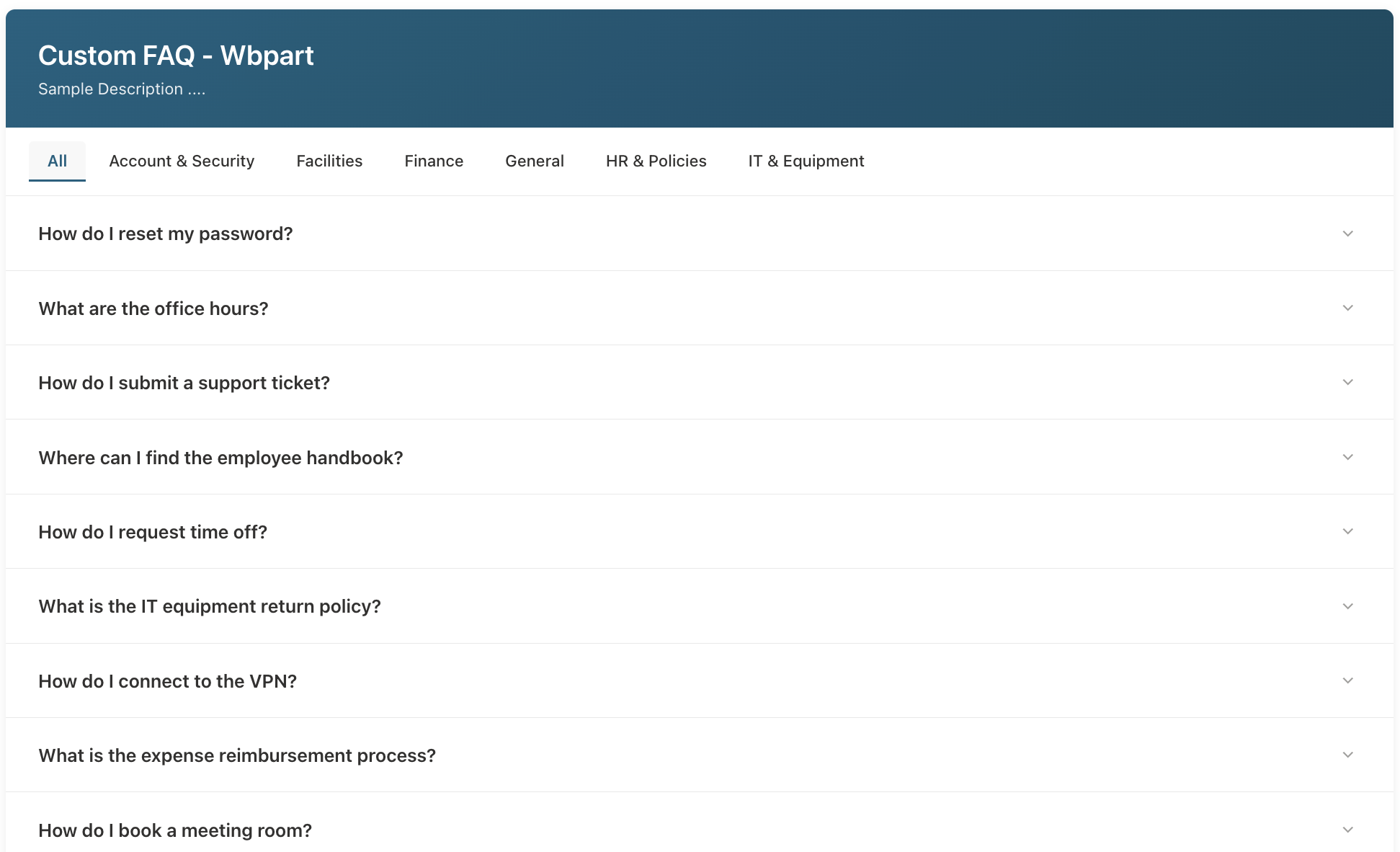
The CustomFAQ SharePoint Framework (SPFx) Web Part is a modern, responsive, and theme-aware SharePoint FAQ web part that turns any SharePoint list into an interactive FAQ accordion. It’s ideal for IT support portals, HR knowledge bases, onboarding sites, and global intranets that need a user-friendly SharePoint list FAQ experience.
Built on SPFx, it supports SharePoint Online branding, accessibility, and performance best practices while remaining easy to configure for site owners and content authors.
CustomFAQ Web Part Preview
Below are example areas where you can insert screenshots of the web part in your WordPress media library:
Key Features of the CustomFAQ SharePoint FAQ Web Part
1. Full SharePoint Theme Integration
CustomFAQ is fully theme-aware and respects your SharePoint Online branding. It uses semantic and palette-based theme tokens so the FAQ automatically matches the site color scheme, even when sections change between light, neutral, or dark backgrounds.
- Uses SPFx semantic theme tokens (e.g.
themePrimary,bodyText,neutralLighter). - Supports section background awareness through
ThemeProvider. - Exposes colors as CSS custom properties for maximum compatibility.
- Fully supports Windows High Contrast mode and SharePoint accessibility features.
2. Dynamic Property Pane Configuration
The SPFx FAQ accordion web part provides a rich configuration experience directly in the SharePoint page editor. No code changes are required for content authors.
- Webpart Title – Header text above the FAQ.
- Webpart Description – Short subtitle or description.
- Select List – Dropdown of all custom lists in the current site.
- Title Column – Single- or multi-line text column mapped as the FAQ question.
- Description Column – Single- or multi-line text column mapped as the FAQ answer (supports rich text).
- Category Column – Optional column for grouping FAQs into tabs (e.g. HR, IT, Finance).
- Allow Multiple Items Expanded – Toggle between single-open and multi-open accordion behavior.
3. Attachment Support
Many FAQ scenarios need downloadable forms, policy PDFs, or related documents. CustomFAQ automatically:
- Detects list item attachments through the SharePoint REST API.
- Displays clickable file links under each FAQ answer.
- Optionally shows file type icons for quick recognition.
- Opens attachments in a new browser tab to keep users on the FAQ page.
4. Modern Accordion UX
The web part uses a clean, modern FAQ accordion that works great on desktop and mobile:
- Smooth expand/collapse animations.
- Keyboard accessible (Enter/Space to toggle, Tab to move between questions).
- Optional “multiple items expanded” mode.
- Focus indicators and ARIA attributes for screen readers.
SEO Keywords Targeted by This Solution
This CustomFAQ solution helps address popular SharePoint search queries such as: SharePoint FAQ web part, SPFx FAQ accordion, SharePoint Online FAQ solution, SharePoint list FAQ, and custom SharePoint web part for FAQs. Including these keywords in your documentation and internal blog posts can improve discoverability for admins and developers.
Installation and Deployment (SPFx)
CustomFAQ is built as a standard SPFx client-side web part. Use the steps below to install it into your SharePoint Online tenant.
Prerequisites
- Node.js v16 or v18 (LTS recommended).
- SharePoint Framework (SPFx) 1.18.2 or later.
- Gulp 4.x installed globally.
- Access to the SharePoint App Catalog.
Install Dependencies
npm install
gulp serve
Build and Package for Production
gulp bundle --ship
gulp package-solution --ship
Deploy to SharePoint
- Upload the generated
.sppkgfile to your SharePoint App Catalog. - Approve any required API permissions.
- Make the app available to all sites or specific site collections.
- Add the Custom FAQ web part to a modern page and configure it via the property pane.
SharePoint List Setup for the Custom FAQ Web Part
The CustomFAQ SPFx web part reads its data from a standard SharePoint custom list, which makes it easy to maintain FAQs without touching the web part code.
Recommended Columns
| Column Name | Type | Required | Usage |
|---|---|---|---|
| Title | Single line of text | Yes | FAQ question text. |
| Answer | Multiple lines of text (rich text) | Yes | FAQ answer with optional formatting and links. |
| Category | Choice | No | Optional category label used for tabs (e.g. “Account & Security”, “Facilities”, “IT & Equipment”). |
| SortOrder | Number | No | Optional numeric value to control FAQ ordering. |
If you want to show file downloads, enable attachments in: List Settings → Advanced Settings → Attachments.
Recommended Permission Configuration
To create a secure but flexible FAQ solution, configure your SharePoint list with role-based permissions:
1. Break Permission Inheritance
- Open your FAQ list.
- Navigate to List Settings → Permissions for this list.
- Click Stop Inheriting Permissions.
2. Assign Role-Based Permissions
- Visitors / Everyone – Grant Read permission only.
- FAQ Contributors – Grant Contribute permission to allow adding/editing their own FAQs.
- Owners / Admins – Keep Full Control for complete list management.
3. Item-Level Permissions
In List Settings → Advanced Settings, configure:
- Read access: Read all items.
- Create and Edit access: Create items and edit items that were created by the user.
Permission Matrix Summary
| Role | Read All Items | Create | Edit Own | Edit All | Delete Own | Delete All |
|---|---|---|---|---|---|---|
| Visitors | Yes | No | No | No | No | No |
| Contributors | Yes | Yes | Yes | No | Yes | No |
| Owners | Yes | Yes | Yes | Yes | Yes | Yes |
Theme Integration and Code Examples
One of the biggest advantages of this SharePoint theme-aware web part is its tight integration with SharePoint’s theming engine. Below are some examples you can reference or include in technical documentation.
Using SPFx Theme Tokens in SCSS
.faqHeader {
  background-color: "[theme:themePrimary, default:#0078d4]";
}

.faqQuestionText {
  color: "[theme:bodyText, default:#323130]";
}
ThemeProvider Integration in the Web Part
import { ThemeProvider, ThemeChangedEventArgs } from '@microsoft/sp-component-base';

private _themeProvider: ThemeProvider;
private _themeVariant: IReadonlyTheme | undefined;

protected onInit(): Promise<void> {
  this._themeProvider = this.context.serviceScope.consume(ThemeProvider.serviceKey);
  this._themeVariant = this._themeProvider.tryGetTheme();

  this._themeProvider.themeChangedEvent.add(this, this._handleThemeChanged);
  return Promise.resolve();
}

private _handleThemeChanged(args: ThemeChangedEventArgs): void {
  this._themeVariant = args.theme;
  // Update CSS variables or re-render as needed
}
CSS Variables for Theme Colors
:root {
  --bodyText: #323130;
  --neutralLighter: #f4f4f4;
}

.faq-item {
  color: var(--bodyText);
  background-color: var(--neutralLighter);
}
SharePoint REST API Call Example
The underlying services use the SharePoint REST API to load FAQ items, including attachments, from the configured list.
public getListItems(listId: string, titleField: string, descField: string): Promise<IFaqItem[]> {
  const endpoint = `${this._siteUrl}/_api/web/lists(guid'${listId}')/items` +
    `?$select=Id,${titleField},${descField},Category,SortOrder,Attachments,AttachmentFiles` +
    `&$expand=AttachmentFiles&$orderby=SortOrder asc,Id asc`;

  return this._spHttpClient.get(endpoint, SPHttpClient.configurations.v1)
    .then((res: SPHttpClientResponse) => res.json())
    .then((data: any) => data.value as IFaqItem[]);
}
Accessibility and Browser Support
CustomFAQ follows WCAG 2.1 AA guidelines and is designed to work smoothly with screen readers and keyboard-only navigation:
- ARIA attributes for accordion state (expanded/collapsed).
- Focus outlines and skip-to-content behavior.
- Keyboard navigation for opening and closing FAQ items.
- High contrast mode support via theme tokens.
Supported browsers include Microsoft Edge (Chromium), Google Chrome, Mozilla Firefox, and Safari.
Troubleshooting the Custom FAQ Web Part
| Issue | Possible Cause | Solution |
|---|---|---|
| Lists are not loading in the property pane. | The user doesn’t have permission to read site lists. | Grant at least Read permission to the site or list. |
| Columns are missing from dropdowns. | Only text and multi-line text fields are supported for Title/Description. | Verify the selected columns are text-based fields. |
| Attachments are not showing. | List attachments are disabled. | Enable attachments in List Settings → Advanced Settings. |
| Theme colors are not applied. | supportsThemeVariants may not be enabled. |
Enable supportsThemeVariants: true in the web part manifest and redeploy. |
Conclusion: A Powerful SharePoint Online FAQ Solution
The CustomFAQ SPFx Web Part is a powerful and flexible option for organizations that want a modern SharePoint FAQ accordion built on top of standard lists. It combines:
- Theme-aware design with full SPFx ThemeProvider support.
- Dynamic configuration through the property pane.
- Category-based navigation with tabs.
- Attachment handling for forms and documents.
- Enterprise-ready permissions and accessibility.
If you are looking to upgrade a basic FAQ page into a branded, interactive knowledge experience, this SharePoint Online FAQ solution is an excellent choice. It delivers the flexibility that developers expect from SPFx and the ease of use that content owners need to keep information accurate and up to date.